Notion
Notion
How I Organize My Life with Notion Second Brain 7.0 (SB7)
How I Organize My Life with Notion Second Brain 7.0 (SB7)
How I Organize My Life with Notion Second Brain 7.0 (SB7)
How I Organize My Life with Notion Second Brain 7.0 (SB7)

My Notion Life Planner for 2027: Second Brain 7.0 (SB7)
I've been using Notion to organize my life for almost 7 four years now.
And for the past year, my go-to daily planner was Creator Brain 4.0. It helped me manage my personal life, content creation, and pretty much everything else in one place.
Because I hate having five different apps just to organize my life.
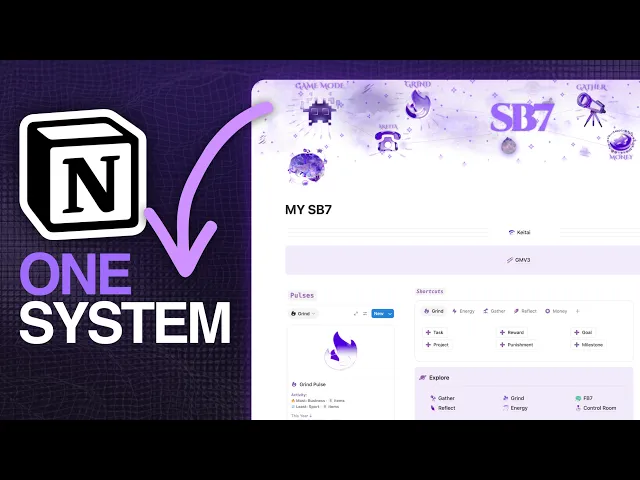
But after spending an entire year building Second Brain 7.0 (SB7), I immediately switched.
And since so many of you have asked how I actually use it, I thought I'd show you.
The funny thing is, even though I've built hundreds of features into this system, my personal setup is probably much simpler than you think.
I recorded a full walkthrough of my setup, my daily routine, and the features I don't even use.
If you'd rather watch than read, grab something to drink and enjoy.
It starts with your life
When you first get SB7, there's a setup process divided into three phases.
The first is simply deciding which areas of your life you want to organize.

Business, health, fitness, relationships, hobbies, whatever matters to you.
I've included plenty of life areas to choose from, along with covers and icons, but you can create your own.
And here's something I keep telling people: remove the things you don't need.
If you're running a business, you might not need a separate career area. Delete it.
If you're not interested in tracking sports, remove that too.
Then come your habits.

Personally, I keep around three or four good habits. That's enough for me.
One of them is listening to a podcast every day. Another is reading. I also track my daily steps.
You can have 15 habits if you want, but I don't see the point of tracking things I don't genuinely care about.
After that, you activate your recurring journals, weekly reports, monthly reviews, and whatever else you plan to use.
And if you're interested in Game Mode, there's one additional setup phase for your character.
That's pretty much it.

My goals come first
Before I start planning my days, I set my goals.
This is probably one of the most important things I do in SB7.
Because once I know what I'm trying to achieve this year, deciding what to work on today becomes much easier.

For example, let's say my goal is to learn handstand push-ups.
I can break that goal into milestones, like holding a handstand for five seconds or completing a certain number of push-ups.
Then I can create a recurring task to practice every day.
That task automatically appears on my daily dashboard.
And whenever I complete it, the system creates the next occurrence.
But here's the thing.
Some goals don't need milestones. Some don't even need projects.
So I leave those fields empty.
You really don't have to break down every single thing in your life into 20 steps.
Where I spend my days
Here's something that might surprise you.
I spend around 90% of my time in SB7 on the main dashboard.

Sometimes, I can go five days without opening any of the other dashboards.
Everything I need is already in front of me.
My daily tasks, habits, workouts, progress, and shortcuts.
When I wake up, I check my Battle Log, which is basically my daily report. It shows me what needs to be done and how I'm doing.
Then I get to work.
And because I already planned my goals and projects, most of my tasks are waiting for me.
Let's take content creation as an example.
I used to manage my content inside Creator Brain's dedicated content database.

Now, I simply use SB7's Projects database.
A YouTube video becomes a project with a few tasks:
Plan the video.
Record it.
Edit it.
Design the thumbnail.
Publish.
As I finish each task, I mark it as done and watch the project progress update.
Nothing complicated.
For deeper work, I use Tarkiz, my gamified deep-work system, which connects to my workflow.

And once I'm finished working, I move on to my other habits.
The power of streaks
I love streaks.
I've built them into tasks, habits, workouts, journaling, and pretty much everywhere I could.

And they've genuinely helped me stay consistent.
For example, at the time I recorded the video, I was on a 79-day reading streak.
I've also completed a journaling streak challenge, something I used to struggle with because I could barely journal consistently for 20 days.
Now I have Streak Wars.
You choose a habit, set a challenge, and decide how many days you want to maintain it.

You can attach rewards and consequences to the challenge, and there's even a new feature I've been working on that lets you save a streak after slipping.
It's one of my favorite parts of SB7.
There's something satisfying about seeing your progress build up day after day.
How I actually journal
At the end of the day, I open my journal.
I've tried different journaling methods, but the one I use now works perfectly for me.
I record my mood, give the day a score, write one word to describe it, and reflect on whatever happened.
Sometimes I write about something I'm grateful for or a win from the day.
Other times, I just write whatever comes to mind.
Once I'm done, I log the entry and keep my streak going.
I also check my weekly reports and, at the end of each month, compare my progress with the previous month.

I like knowing whether I'm improving.
How many tasks did I finish? Did I read more? Was my average mood better? How consistent was I with journaling?
It's interesting to look back and see how things have changed.
Everything else I track
I use Gather a lot, especially for books and podcasts.
I can save notes, ideas, resources, and quotes from whatever I'm consuming.

One feature I particularly like is Daily Word, which randomly brings back a quote I've previously saved.
So something useful I heard in a podcast months ago might show up again today.
For reading, I can either track individual reading sessions or simply enter the page I'm currently on.
I switch between both depending on the book.
I also use the workout planner.
My workouts are recurring, so I don't need to create them every week.
And when I break a personal record, I can log it and see how much I've improved.

I'm trying to keep all this in Notion because I haven't been using a smartphone for almost two years.
Having everything accessible from my laptop makes my life easier.
Turning productivity into a game
Now, this is where things get interesting.
SB7 has an optional Game Mode that turns your productivity into an RPG-style experience.

You have a character, skills, levels, ranks, challenges, rewards, and an energy system.
I personally use it.
At the end of the day, I check whether I've completed any challenges, collect my rewards, and see how my character is progressing.
I've also set myself a bigger challenge: unlock all ten ranks within a year.
And some members of the community are doing it with me.
I find that incredibly fun.
Having a target outside my regular tasks gives me another reason to stay consistent.
But if gamification isn't your thing, there's a normal version of SB7 without Game Mode.
You can use the system without any of this.
What I don't use
Now for the part many of you have asked about.
Do I actually use every feature I've built?
Of course not.
For example, I don't use the meal planner.

I still live with my parents, and I don't cook. Whatever is on the table, I eat.
So meal planning isn't something I need right now.
I also haven't had much reason to use medical appointments, supplements, or certain health-tracking features.
I do want to start using Body Log to track changes in my weight and muscle measurements, but I haven't made it part of my routine yet.
There's also Keitai, a mobile-friendly layout I created for SB7.
Since I don't have a phone, I don't personally use it.
And that's completely fine.
Just because a feature exists doesn't mean you have to use it.
I've had customers tell me that SB7 has too many things they don't need.
But you can hide sections, close properties, ignore features, and keep the system as simple as you want.
I designed it to give you that freedom.
Simple when you need it
This is probably the best way I can explain my philosophy behind SB7.
I want it to be powerful when you need that power.
When you want to create a reward for completing a goal, you can.
When you want to track your reading in detail, you can.
When you want to turn your productivity into a game, you can.
And when you just want to wake up, check your tasks, do your habits, and get on with your life, you can do that too.
That's how I use it most days.
I've spent almost four years experimenting with different systems, and this is the one I'm taking into 2027.
I'm happy with what I've built, and there's still a lot I want to improve.
But if you've already found a system that works for you, keep using it.
What's important is actually getting things done.
Want to try SB7?
If you want a single place to organize your tasks, projects, goals, habits, reading, journaling, workouts, and everything else, take a look at Second Brain 7.0 (SB7).
You can keep it incredibly simple or take advantage of the advanced features whenever you need them.
And if you want to make productivity a little more fun, Game Mode V3 is there too.
Get Notion SB7 →

My Notion Life Planner for 2027: Second Brain 7.0 (SB7)
I've been using Notion to organize my life for almost 7 four years now.
And for the past year, my go-to daily planner was Creator Brain 4.0. It helped me manage my personal life, content creation, and pretty much everything else in one place.
Because I hate having five different apps just to organize my life.
But after spending an entire year building Second Brain 7.0 (SB7), I immediately switched.
And since so many of you have asked how I actually use it, I thought I'd show you.
The funny thing is, even though I've built hundreds of features into this system, my personal setup is probably much simpler than you think.
I recorded a full walkthrough of my setup, my daily routine, and the features I don't even use.
If you'd rather watch than read, grab something to drink and enjoy.
It starts with your life
When you first get SB7, there's a setup process divided into three phases.
The first is simply deciding which areas of your life you want to organize.
Business, health, fitness, relationships, hobbies, whatever matters to you.
I've included plenty of life areas to choose from, along with covers and icons, but you can create your own.
And here's something I keep telling people: remove the things you don't need.
If you're running a business, you might not need a separate career area. Delete it.
If you're not interested in tracking sports, remove that too.
Then come your habits.
Personally, I keep around three or four good habits. That's enough for me.
One of them is listening to a podcast every day. Another is reading. I also track my daily steps.
You can have 15 habits if you want, but I don't see the point of tracking things I don't genuinely care about.
After that, you activate your recurring journals, weekly reports, monthly reviews, and whatever else you plan to use.
And if you're interested in Game Mode, there's one additional setup phase for your character.
That's pretty much it.
My goals come first
Before I start planning my days, I set my goals.
This is probably one of the most important things I do in SB7.
Because once I know what I'm trying to achieve this year, deciding what to work on today becomes much easier.
For example, let's say my goal is to learn handstand push-ups.
I can break that goal into milestones, like holding a handstand for five seconds or completing a certain number of push-ups.
Then I can create a recurring task to practice every day.
That task automatically appears on my daily dashboard.
And whenever I complete it, the system creates the next occurrence.
But here's the thing.
Some goals don't need milestones. Some don't even need projects.
So I leave those fields empty.
You really don't have to break down every single thing in your life into 20 steps.
Where I spend my days
Here's something that might surprise you.
I spend around 90% of my time in SB7 on the main dashboard.
Sometimes, I can go five days without opening any of the other dashboards.
Everything I need is already in front of me.
My daily tasks, habits, workouts, progress, and shortcuts.
When I wake up, I check my Battle Log, which is basically my daily report. It shows me what needs to be done and how I'm doing.
Then I get to work.
And because I already planned my goals and projects, most of my tasks are waiting for me.
Let's take content creation as an example.
I used to manage my content inside Creator Brain's dedicated content database.
Now, I simply use SB7's Projects database.
A YouTube video becomes a project with a few tasks:
Plan the video.
Record it.
Edit it.
Design the thumbnail.
Publish.
As I finish each task, I mark it as done and watch the project progress update.
Nothing complicated.
For deeper work, I use Tarkiz, my gamified deep-work system, which connects to my workflow.
And once I'm finished working, I move on to my other habits.
The power of streaks
I love streaks.
I've built them into tasks, habits, workouts, journaling, and pretty much everywhere I could.
And they've genuinely helped me stay consistent.
For example, at the time I recorded the video, I was on a 79-day reading streak.
I've also completed a journaling streak challenge, something I used to struggle with because I could barely journal consistently for 20 days.
Now I have Streak Wars.
You choose a habit, set a challenge, and decide how many days you want to maintain it.
You can attach rewards and consequences to the challenge, and there's even a new feature I've been working on that lets you save a streak after slipping.
It's one of my favorite parts of SB7.
There's something satisfying about seeing your progress build up day after day.
How I actually journal
At the end of the day, I open my journal.
I've tried different journaling methods, but the one I use now works perfectly for me.
I record my mood, give the day a score, write one word to describe it, and reflect on whatever happened.
Sometimes I write about something I'm grateful for or a win from the day.
Other times, I just write whatever comes to mind.
Once I'm done, I log the entry and keep my streak going.
I also check my weekly reports and, at the end of each month, compare my progress with the previous month.
I like knowing whether I'm improving.
How many tasks did I finish? Did I read more? Was my average mood better? How consistent was I with journaling?
It's interesting to look back and see how things have changed.
Everything else I track
I use Gather a lot, especially for books and podcasts.
I can save notes, ideas, resources, and quotes from whatever I'm consuming.
One feature I particularly like is Daily Word, which randomly brings back a quote I've previously saved.
So something useful I heard in a podcast months ago might show up again today.
For reading, I can either track individual reading sessions or simply enter the page I'm currently on.
I switch between both depending on the book.
I also use the workout planner.
My workouts are recurring, so I don't need to create them every week.
And when I break a personal record, I can log it and see how much I've improved.
I'm trying to keep all this in Notion because I haven't been using a smartphone for almost two years.
Having everything accessible from my laptop makes my life easier.
Turning productivity into a game
Now, this is where things get interesting.
SB7 has an optional Game Mode that turns your productivity into an RPG-style experience.
You have a character, skills, levels, ranks, challenges, rewards, and an energy system.
I personally use it.
At the end of the day, I check whether I've completed any challenges, collect my rewards, and see how my character is progressing.
I've also set myself a bigger challenge: unlock all ten ranks within a year.
And some members of the community are doing it with me.
I find that incredibly fun.
Having a target outside my regular tasks gives me another reason to stay consistent.
But if gamification isn't your thing, there's a normal version of SB7 without Game Mode.
You can use the system without any of this.
What I don't use
Now for the part many of you have asked about.
Do I actually use every feature I've built?
Of course not.
For example, I don't use the meal planner.
I still live with my parents, and I don't cook. Whatever is on the table, I eat.
So meal planning isn't something I need right now.
I also haven't had much reason to use medical appointments, supplements, or certain health-tracking features.
I do want to start using Body Log to track changes in my weight and muscle measurements, but I haven't made it part of my routine yet.
There's also Keitai, a mobile-friendly layout I created for SB7.
Since I don't have a phone, I don't personally use it.
And that's completely fine.
Just because a feature exists doesn't mean you have to use it.
I've had customers tell me that SB7 has too many things they don't need.
But you can hide sections, close properties, ignore features, and keep the system as simple as you want.
I designed it to give you that freedom.
Simple when you need it
This is probably the best way I can explain my philosophy behind SB7.
I want it to be powerful when you need that power.
When you want to create a reward for completing a goal, you can.
When you want to track your reading in detail, you can.
When you want to turn your productivity into a game, you can.
And when you just want to wake up, check your tasks, do your habits, and get on with your life, you can do that too.
That's how I use it most days.
I've spent almost four years experimenting with different systems, and this is the one I'm taking into 2027.
I'm happy with what I've built, and there's still a lot I want to improve.
But if you've already found a system that works for you, keep using it.
What's important is actually getting things done.
Want to try SB7?
If you want a single place to organize your tasks, projects, goals, habits, reading, journaling, workouts, and everything else, take a look at Second Brain 7.0 (SB7).
You can keep it incredibly simple or take advantage of the advanced features whenever you need them.
And if you want to make productivity a little more fun, Game Mode V3 is there too.
Get Notion SB7 →
My Notion Life Planner for 2027: Second Brain 7.0 (SB7)
I've been using Notion to organize my life for almost 7 four years now.
And for the past year, my go-to daily planner was Creator Brain 4.0. It helped me manage my personal life, content creation, and pretty much everything else in one place.
Because I hate having five different apps just to organize my life.
But after spending an entire year building Second Brain 7.0 (SB7), I immediately switched.
And since so many of you have asked how I actually use it, I thought I'd show you.
The funny thing is, even though I've built hundreds of features into this system, my personal setup is probably much simpler than you think.
I recorded a full walkthrough of my setup, my daily routine, and the features I don't even use.
If you'd rather watch than read, grab something to drink and enjoy.
It starts with your life
When you first get SB7, there's a setup process divided into three phases.
The first is simply deciding which areas of your life you want to organize.
Business, health, fitness, relationships, hobbies, whatever matters to you.
I've included plenty of life areas to choose from, along with covers and icons, but you can create your own.
And here's something I keep telling people: remove the things you don't need.
If you're running a business, you might not need a separate career area. Delete it.
If you're not interested in tracking sports, remove that too.
Then come your habits.
Personally, I keep around three or four good habits. That's enough for me.
One of them is listening to a podcast every day. Another is reading. I also track my daily steps.
You can have 15 habits if you want, but I don't see the point of tracking things I don't genuinely care about.
After that, you activate your recurring journals, weekly reports, monthly reviews, and whatever else you plan to use.
And if you're interested in Game Mode, there's one additional setup phase for your character.
That's pretty much it.
My goals come first
Before I start planning my days, I set my goals.
This is probably one of the most important things I do in SB7.
Because once I know what I'm trying to achieve this year, deciding what to work on today becomes much easier.
For example, let's say my goal is to learn handstand push-ups.
I can break that goal into milestones, like holding a handstand for five seconds or completing a certain number of push-ups.
Then I can create a recurring task to practice every day.
That task automatically appears on my daily dashboard.
And whenever I complete it, the system creates the next occurrence.
But here's the thing.
Some goals don't need milestones. Some don't even need projects.
So I leave those fields empty.
You really don't have to break down every single thing in your life into 20 steps.
Where I spend my days
Here's something that might surprise you.
I spend around 90% of my time in SB7 on the main dashboard.
Sometimes, I can go five days without opening any of the other dashboards.
Everything I need is already in front of me.
My daily tasks, habits, workouts, progress, and shortcuts.
When I wake up, I check my Battle Log, which is basically my daily report. It shows me what needs to be done and how I'm doing.
Then I get to work.
And because I already planned my goals and projects, most of my tasks are waiting for me.
Let's take content creation as an example.
I used to manage my content inside Creator Brain's dedicated content database.
Now, I simply use SB7's Projects database.
A YouTube video becomes a project with a few tasks:
Plan the video.
Record it.
Edit it.
Design the thumbnail.
Publish.
As I finish each task, I mark it as done and watch the project progress update.
Nothing complicated.
For deeper work, I use Tarkiz, my gamified deep-work system, which connects to my workflow.
And once I'm finished working, I move on to my other habits.
The power of streaks
I love streaks.
I've built them into tasks, habits, workouts, journaling, and pretty much everywhere I could.
And they've genuinely helped me stay consistent.
For example, at the time I recorded the video, I was on a 79-day reading streak.
I've also completed a journaling streak challenge, something I used to struggle with because I could barely journal consistently for 20 days.
Now I have Streak Wars.
You choose a habit, set a challenge, and decide how many days you want to maintain it.
You can attach rewards and consequences to the challenge, and there's even a new feature I've been working on that lets you save a streak after slipping.
It's one of my favorite parts of SB7.
There's something satisfying about seeing your progress build up day after day.
How I actually journal
At the end of the day, I open my journal.
I've tried different journaling methods, but the one I use now works perfectly for me.
I record my mood, give the day a score, write one word to describe it, and reflect on whatever happened.
Sometimes I write about something I'm grateful for or a win from the day.
Other times, I just write whatever comes to mind.
Once I'm done, I log the entry and keep my streak going.
I also check my weekly reports and, at the end of each month, compare my progress with the previous month.
I like knowing whether I'm improving.
How many tasks did I finish? Did I read more? Was my average mood better? How consistent was I with journaling?
It's interesting to look back and see how things have changed.
Everything else I track
I use Gather a lot, especially for books and podcasts.
I can save notes, ideas, resources, and quotes from whatever I'm consuming.
One feature I particularly like is Daily Word, which randomly brings back a quote I've previously saved.
So something useful I heard in a podcast months ago might show up again today.
For reading, I can either track individual reading sessions or simply enter the page I'm currently on.
I switch between both depending on the book.
I also use the workout planner.
My workouts are recurring, so I don't need to create them every week.
And when I break a personal record, I can log it and see how much I've improved.
I'm trying to keep all this in Notion because I haven't been using a smartphone for almost two years.
Having everything accessible from my laptop makes my life easier.
Turning productivity into a game
Now, this is where things get interesting.
SB7 has an optional Game Mode that turns your productivity into an RPG-style experience.
You have a character, skills, levels, ranks, challenges, rewards, and an energy system.
I personally use it.
At the end of the day, I check whether I've completed any challenges, collect my rewards, and see how my character is progressing.
I've also set myself a bigger challenge: unlock all ten ranks within a year.
And some members of the community are doing it with me.
I find that incredibly fun.
Having a target outside my regular tasks gives me another reason to stay consistent.
But if gamification isn't your thing, there's a normal version of SB7 without Game Mode.
You can use the system without any of this.
What I don't use
Now for the part many of you have asked about.
Do I actually use every feature I've built?
Of course not.
For example, I don't use the meal planner.
I still live with my parents, and I don't cook. Whatever is on the table, I eat.
So meal planning isn't something I need right now.
I also haven't had much reason to use medical appointments, supplements, or certain health-tracking features.
I do want to start using Body Log to track changes in my weight and muscle measurements, but I haven't made it part of my routine yet.
There's also Keitai, a mobile-friendly layout I created for SB7.
Since I don't have a phone, I don't personally use it.
And that's completely fine.
Just because a feature exists doesn't mean you have to use it.
I've had customers tell me that SB7 has too many things they don't need.
But you can hide sections, close properties, ignore features, and keep the system as simple as you want.
I designed it to give you that freedom.
Simple when you need it
This is probably the best way I can explain my philosophy behind SB7.
I want it to be powerful when you need that power.
When you want to create a reward for completing a goal, you can.
When you want to track your reading in detail, you can.
When you want to turn your productivity into a game, you can.
And when you just want to wake up, check your tasks, do your habits, and get on with your life, you can do that too.
That's how I use it most days.
I've spent almost four years experimenting with different systems, and this is the one I'm taking into 2027.
I'm happy with what I've built, and there's still a lot I want to improve.
But if you've already found a system that works for you, keep using it.
What's important is actually getting things done.
Want to try SB7?
If you want a single place to organize your tasks, projects, goals, habits, reading, journaling, workouts, and everything else, take a look at Second Brain 7.0 (SB7).
You can keep it incredibly simple or take advantage of the advanced features whenever you need them.
And if you want to make productivity a little more fun, Game Mode V3 is there too.
Get Notion SB7 →


